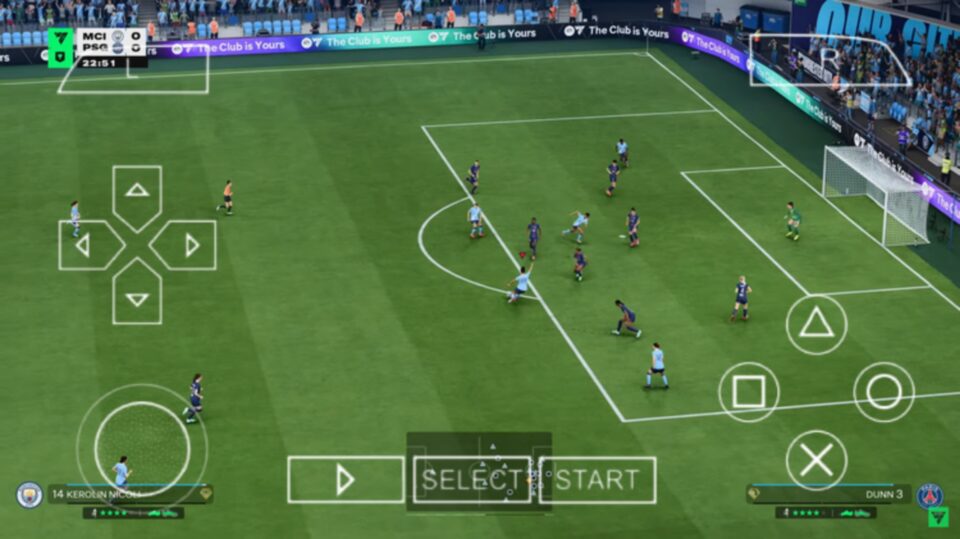
Download FC 26 PPSSPP without SAVEDATA or TEXTURES for Android. Learn how to install, play, fix common errors, and enjoy the latest PSP football game.
What Is FC 26 PPSSPP Without SAVEDATA Or TEXTURES?
FC 26 PPSSPP is a modified PSP football game designed to run on the PPSSPP emulator for Android. It is based on older PSP football titles but has been updated by the modding community with modern football content.
Unlike versions that require separate SAVEDATA and TEXTURES folders, this edition stores everything necessary inside the ISO file itself. That means players can enjoy the game without copying additional files into the PSP folder.
Depending on the version you download, the game may include updated 2025/2026 club transfers, latest player ratings, new club kits, updated team logos, modern menu backgrounds, improved gameplay tweaks, latest tournaments and leagues, and better commentary in selected versions.
FC 26 PPSSPP Game Information
| Feature | Details |
|---|---|
| Game Name | FC 26 PPSSPP |
| Platform | PSP (PPSSPP Emulator) |
| File Format | ISO |
| Developer | Based on EA Sports PSP football engine |
| Mod Type | Football Mod |
| Android Support | Yes |
| Offline Mode | Yes |
| Internet Required | No |
| Installation | ISO Only |
| SAVEDATA Required | No |
| TEXTURES Required | No |
Why This Version Is Popular
Many football fans prefer lightweight PPSSPP games because they are much easier to install. Since no separate SAVEDATA or TEXTURES files are needed, the setup process takes only a few minutes.
- Faster download size
- No extra texture files
- No separate savedata installation
- Works offline
- Simple setup process
- Less storage required
- Compatible with many Android devices
- Smooth gameplay on mid-range phones
Main Features
Updated Transfers
Many FC 26 PPSSPP mods include the latest player transfers so squads reflect the current football season.
Improved Graphics
Although the PSP hardware has limitations, modders improve the visual presentation with updated menus, kits, boots, balls, and stadium designs packed into the ISO.
Offline Gameplay
No internet connection is needed after installation. You can enjoy Career Mode, Exhibition Matches, League competitions, and Cup tournaments offline.
Modern Club Kits
Most clubs feature refreshed home, away, and third kits inspired by the latest season.
Updated Player Faces
Several popular players receive improved face textures compared to the original PSP release.
Smooth Performance
Since this version skips separate texture loading, performance is often more stable on lower-end Android devices.
Minimum Requirements
- Android Version: Android 6.0 or newer
- RAM: 2 GB minimum
- Storage: At least 2 GB free space
- Processor: Quad-Core processor or better
- Emulator: Latest PPSSPP Emulator
Advantages
One of the biggest strengths of this version is its simplicity. Installation is straightforward because there are no additional folders to copy into the PSP directory.
The game also consumes less storage than many heavily modified PPSSPP football games. This makes it suitable for devices with limited internal memory.
Offline gameplay means you can enjoy matches anywhere without mobile data or Wi-Fi. Performance is generally smoother because the emulator has fewer external assets to load during gameplay.
Disadvantages
Graphics may not be as detailed as PPSSPP versions that rely on large HD texture packs. Some versions have fewer licensed leagues or competitions because they are community-created modifications.
Depending on the mod creator, certain player faces or kits may not perfectly match the latest season. Updates are usually released manually, meaning you need to download a newer ISO whenever transfers change.
Best PPSSPP Settings
- Graphics Backend: Vulkan (if supported) or OpenGL
- Rendering Resolution: 2x PSP
- Frameskipping: Off
- Buffered Rendering: On
- Texture Scaling: Auto
- Fast Memory: Enabled
- Lazy Texture Caching: Enabled
- Hardware Transform: Enabled
How To Install FC 26 PPSSPP Without SAVEDATA Or TEXTURES
- Download the FC 26 PPSSPP ISO file.
- Install the latest PPSSPP Emulator.
- Install ZArchiver or any file extraction app.
- Extract the downloaded ZIP or RAR file.
- Move the ISO file to any folder such as Internal Storage > PSP Games.
- Open the PPSSPP Emulator.
- Browse to the folder containing the ISO file.
- Tap the game icon and start playing.
No SAVEDATA installation is required, and no TEXTURES folder is needed.
How To Fix Common Issues
Black Screen
Update your PPSSPP Emulator, switch between Vulkan and OpenGL graphics, and make sure the ISO file is not corrupted.
Game Keeps Crashing
Close background apps, clear the PPSSPP cache, reduce the rendering resolution, and verify that the ISO file was extracted correctly.
Slow Gameplay
Lower the rendering resolution to 1x PSP, enable Fast Memory, and close unnecessary applications running in the background.
Controls Not Working
Reset the controller settings inside PPSSPP, restore the default layout, and restart the emulator.
Game Not Showing Inside PPSSPP
Ensure the ISO has been extracted correctly, confirm it has the .iso extension, and move it to an accessible storage folder.
Common Mistakes To Avoid
- Do not open ZIP or RAR files directly in PPSSPP.
- Always extract the ISO before launching it.
- Do not rename the ISO file extension.
- Avoid using outdated PPSSPP Emulator versions.
- Keep the game files in an accessible folder.
- Do not delete the ISO if you want to keep your progress.
Final Thoughts
FC 26 PPSSPP without SAVEDATA or TEXTURES is an excellent choice for players who want a lightweight football game that installs quickly and runs smoothly. By eliminating the need for extra folders, the setup process becomes much easier while still delivering updated teams, modern kits, offline gameplay, and enjoyable football action.
If your priority is a simple installation with good performance and minimal storage requirements, this version is one of the most convenient PPSSPP football mods available for Android.

