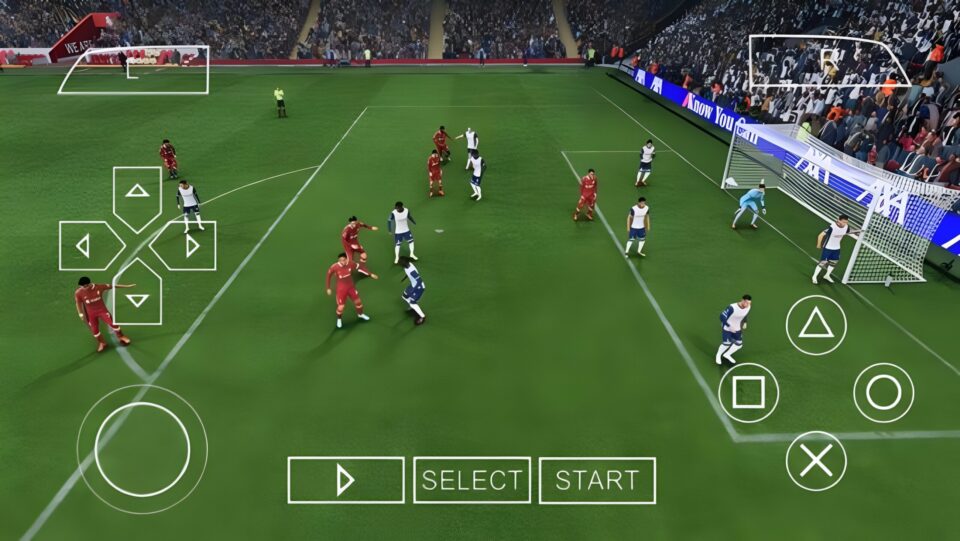
FIFA 2026 PSP ISO review covering new kits, updated transfers, HD graphics, offline gameplay, PPSSPP setup, requirements, and common fixes.
What Is FIFA 2026 PSP ISO HD New Kits?
FIFA 2026 PSP ISO is a community-made football game modification based on classic FIFA PSP titles. Since no official FIFA 26 version was released for PSP hardware, modders continue updating older FIFA PSP games with current football season content, creating an experience that feels much closer to modern football games.
The game includes updated player transfers, modern club squads, refreshed ratings, HD textures, realistic faces, improved menus, new scoreboards, and the latest football kits. Many versions also include enhanced camera angles that provide a wider view of the pitch during matches.
Unlike many online football games, FIFA 2026 PSP ISO can be played entirely offline after installation, making it a popular choice among PPSSPP users.
Main Features of FIFA 2026 PSP ISO
Latest 2025/2026 Transfers
One of the biggest highlights is the updated transfer database. Clubs feature current squads, making career mode and tournaments feel more realistic.
HD New Kits
The game includes updated home, away, third, and special kits for many clubs and national teams. Team badges and league logos are also refreshed to match the latest season.
Improved Graphics
Compared to the original PSP release, this version introduces HD textures, sharper player models, improved grass textures, and enhanced stadium visuals.
Modern Camera Angles
Many FIFA 2026 PPSSPP mods include a PS5-style or 4K camera view that provides a broader perspective of the pitch and improves overall gameplay visibility.
Offline Gameplay
No internet connection is required once the game has been installed successfully, making it ideal for offline football gaming sessions.
Updated Menus and Scoreboards
Modern football presentation elements have been added, including redesigned menus, scoreboards, overlays, and competition branding.
Eligibility Requirements to Play FIFA 2026 PSP ISO
Before installing FIFA 2026 PSP ISO, your Android device should meet a few basic requirements.
- Android Version: Android 6.0 or higher
- RAM: Minimum 2GB RAM
- Storage Space: At least 2GB free space
- Processor: Quad-core processor or better
- Emulator: PPSSPP Emulator or PPSSPP Gold
- Required Files: ISO file, Save Data, and Textures folder if included with the game package
Devices with higher RAM and stronger processors generally deliver smoother gameplay and better graphics performance.
FIFA 2026 PSP ISO Game Information
- Game Name: FIFA 2026 PSP ISO
- Platform: PSP
- Emulator: PPSSPP
- Category: Football Game
- Mode: Offline
- Developer: Based on EA Sports FIFA PSP Engine
- File Format: ISO
- Additional Files: Save Data and Textures
- Graphics: HD
- Camera: PS5 Style / 4K Camera Mod
- Updated Content: Transfers, Kits, Faces, Squads, Logos, Stadiums
Advantages of FIFA 2026 PSP ISO
One major advantage is offline gameplay. Players can enjoy full football matches without relying on an internet connection.
The game is lightweight compared to many modern football games.
Updated transfers and kits keep the experience fresh.
PPSSPP optimization allows smooth performance on many Android devices.
The enhanced camera view improves tactical awareness during matches.
Career mode, tournaments, exhibition matches, and other game modes offer good replay value.
Disadvantages of FIFA 2026 PSP ISO
Despite the improvements, the game still relies on an older PSP football engine.
Some mods may contain occasional bugs or incorrect player data.
Graphics cannot fully match modern console football games.
Installation can be confusing for first-time PPSSPP users.
Different mod versions may vary in quality depending on the creator.
How to Set Up FIFA 2026 PSP ISO on Android
Step 1
Install the PPSSPP Emulator on your Android device.
Step 2
Download the FIFA 2026 PSP ISO file.
Step 3
Extract the downloaded ZIP or RAR file using a file extractor application.
Step 4
Move the ISO file into your PSP or Games folder.
Step 5
If Save Data is included, copy the Save Data folder into:
PSP > SAVEDATA
Step 6
If Textures are included, copy them into:
PSP > TEXTURES
Step 7
Open the PPSSPP Emulator.
Step 8
Locate the ISO file through the PPSSPP file browser.
Step 9
Launch the game and adjust graphics settings according to your device performance.
Recommended PPSSPP Settings
- Rendering Resolution: 2x or 3x PSP
- Texture Filtering: Auto
- Frameskipping: Off
- Buffered Rendering: On
- Fast Memory: On
- Lazy Texture Caching: On
These settings usually provide a good balance between performance and visual quality.
Common Issues and Fixes
Black Screen Problem
Ensure the ISO file is complete and properly extracted.
Update to the latest PPSSPP Emulator version.
Enable Buffered Rendering in graphics settings.
Lag During Matches
Reduce rendering resolution.
Close background applications.
Enable Auto Frameskip if necessary.
Missing Kits or Textures
Confirm that texture files are copied into the correct PSP/TEXTURES folder.
Restart the emulator after copying files.
Save Data Not Working
Verify that Save Data folders are placed inside PSP/SAVEDATA.
Make sure folder names remain unchanged after extraction.
Game Crashes on Launch
Check available storage space.
Use the latest PPSSPP release.
Re-extract corrupted files if necessary.
Common Mistakes to Avoid
Many installation problems happen because files are placed in the wrong folders.
Avoid renaming Save Data folders.
Do not launch compressed ZIP or RAR files directly inside PPSSPP.
Always extract game files before loading them.
Avoid deleting texture folders after installation.
Make sure the ISO file remains inside accessible storage directories.
Why FIFA 2026 PSP ISO Remains Popular
FIFA 2026 PSP ISO continues attracting football gaming fans because it combines modern football content with the convenience of offline PPSSPP gaming. Updated transfers, HD new kits, enhanced graphics, realistic camera angles, and lightweight performance make it one of the most downloaded football game mods available for Android users today.
While it cannot completely replace modern console football titles, it offers an enjoyable football experience that runs smoothly on a wide range of devices and remains one of the strongest choices among PPSSPP football games.
Final Thoughts
FIFA 2026 PSP ISO HD New Kits is a solid option for players who enjoy classic FIFA gameplay but want a more modern football experience. The updated transfers, new kits, improved graphics, refreshed squads, and wider camera options give the old PSP-style gameplay a noticeable refresh.
Overall, if you enjoy PPSSPP football games and want updated 2026-style content without the heavier requirements of newer football titles, this mod is worth checking out.
Frequently Asked Questions
Is FIFA 2026 PSP ISO official?
No. FIFA 2026 PSP ISO is a community-made modification based on older FIFA PSP games.
Can I play FIFA 2026 PSP ISO offline?
Yes. Once the required files are installed correctly, the game can be played offline through PPSSPP.
Does FIFA 2026 PSP ISO have new kits?
Yes. Many versions include updated 2025/2026 club and national team kits.
What emulator do I need?
You need the PPSSPP emulator to run the ISO file on Android or other supported devices.
Can FIFA 2026 PSP ISO run on 2GB RAM?
It may run on some 2GB RAM devices, although stronger phones generally provide smoother performance, especially with HD textures.
Why are my kits not showing?
Check that the texture files are placed in the correct PSP/TEXTURES folder and that texture replacement is enabled in PPSSPP.
What should I do if the game lags?
Lower the rendering resolution, close background apps, and enable frameskipping if necessary. You can also try different rendering backends to find the best performance for your device.

