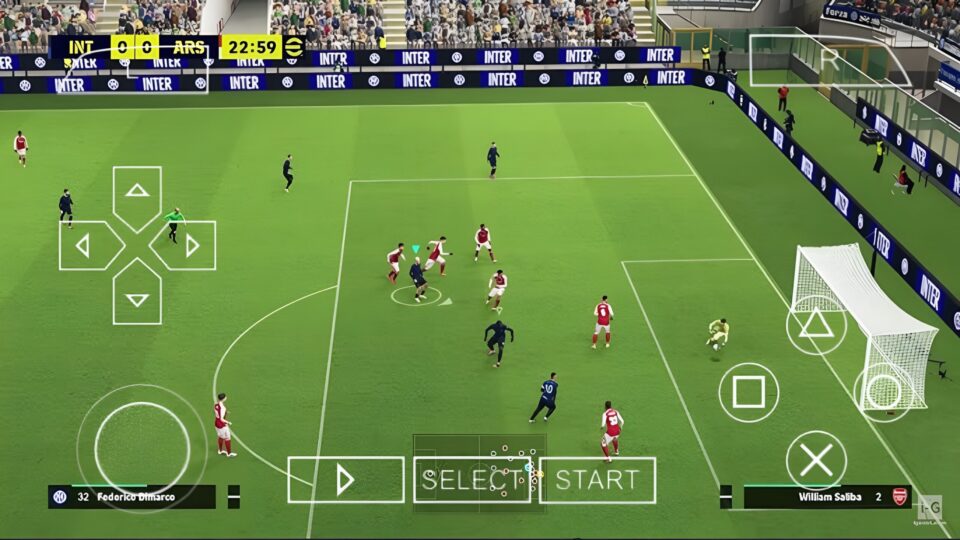
Play eFootball PES 2026 PPSSPP ISO Offline with updated transfers, HD graphics, smooth gameplay, and highly compressed files for Android devices.
What is eFootball PES 2026 PPSSPP ISO Offline?
eFootball PES 2026 PPSSPP ISO Offline is a modified PSP football game based on older Pro Evolution Soccer PSP editions. Modders update the original game with current football content including:
- Latest player transfers
- Updated club kits
- New season tournaments
- Modern scoreboards
- Improved grass textures
- Real player faces
- HD graphics tweaks
- New boots and gloves
- Updated commentary packs
Unlike the official mobile eFootball game from Konami, this PPSSPP version is fully offline after setup. That makes it useful for players with limited internet access or lower-end devices that struggle with newer online football titles.
The gameplay style remains close to classic PES mechanics. Passing feels balanced, dribbling is responsive, and Master League style gameplay still gives that old-school football gaming experience many players prefer over arcade-style gameplay.
Game Information
| Feature | Details |
| Game Title | eFootball PES 2026 PPSSPP ISO |
| Platform | PSP Emulator (PPSSPP) |
| Mode | Offline |
| Category | Football / Sports |
| File Type | ISO, Save Data, Texture Files |
| Developer Base | Konami PSP PES Series |
| Updated By | PES Modding Community |
| Android Support | Yes |
| Highly Compressed | Available in many versions |
| Internet Required | Only for download/setup |
| Emulator Needed | PPSSPP Gold or PPSSPP Standard |
Features of eFootball PES 2026 PPSSPP
Updated Transfers and Squads
One of the biggest reasons players download PES 2026 PPSSPP mods is the latest transfer updates. Clubs feature current lineups with recent signings, updated formations, and improved player ratings.
Popular clubs including Manchester City, Real Madrid, Barcelona, Arsenal, Liverpool, Bayern Munich, and PSG are updated to reflect modern football squads.
Improved Graphics
Compared to older PSP football games, the visual improvements are noticeable. Many PES 2026 mods include HD pitch textures, better crowd visuals, sharper player kits, enhanced stadium lighting, realistic shadows, and redesigned intro screens.
While PPSSPP games cannot fully match modern console graphics, the visual quality is impressive for a PSP-based football game.
Offline Gameplay
A major advantage is complete offline support. Once installation is complete, no internet connection is needed to play exhibition matches, tournaments, career modes, or local gameplay.
Small File Size
Many versions are released as highly compressed PPSSPP games. This helps players save storage space and reduces download time, especially on devices with limited memory.
Smooth Controls
PPSSPP emulator controls are customizable. Players can resize buttons, reposition controls, or connect external gamepads for a more console-like experience.
Eligibility Requirements to Play the Game
Not every Android phone handles PPSSPP games the same way. Device performance depends on RAM, processor strength, and available storage.
Minimum Requirements
| Requirement | Recommended |
| Android Version | Android 7 and above |
| RAM | 2GB minimum |
| Storage Space | 2GB free space |
| Emulator | Latest PPSSPP Emulator |
| Processor | Snapdragon, Helio G-series, Dimensity, or equivalent |
Recommended Setup for Better Performance
- Use at least 4GB RAM
- Enable frame skipping only if necessary
- Keep background apps closed
- Use Vulkan rendering if supported
- Install texture and save files correctly
Phones with gaming-focused chipsets perform much better during matches with HD texture packs enabled.
Advantages of eFootball PES 2026 PPSSPP ISO
- Fully offline gameplay after installation
- Lightweight compared to many modern football games
- Customizable controls and graphics settings
- Works on many Android devices
- Classic PES gameplay experience
Disadvantages of the Game
- Graphics are still limited by PSP hardware
- Some mods may contain bugs or crashes
- Setup can confuse first-time users
- High graphics settings may drain battery faster
How to Set Up eFootball PES 2026 PPSSPP ISO Offline
Step 1: Download the Required Files
You typically need the PES 2026 ISO file, save data folder, texture folder, and PPSSPP Emulator APK. Some versions may also include commentary packs or camera mods.
Step 2: Install PPSSPP Emulator
Install the PPSSPP emulator APK on your Android device. Both the standard and Gold versions are capable of running the game.
Step 3: Extract the Downloaded Files
Most PPSSPP football games come compressed as ZIP or RAR archives. Use a file extractor app to unpack the files correctly.
After extraction, you should see folders such as PSP, SAVEDATA, TEXTURES, and the ISO game file.
Step 4: Move Save Data Files
Copy the SAVEDATA folder into:
Internal Storage > PSP > SAVEDATAStep 5: Move Texture Files
Copy the TEXTURES folder into:
Internal Storage > PSP > TEXTURESIf the TEXTURES folder does not exist, create it manually.
Step 6: Move the ISO File
Place the ISO game file somewhere easy to locate, such as your Games folder.
Step 7: Launch the Game
Open the PPSSPP emulator, locate the ISO file, and tap the game icon to begin playing.
Best PPSSPP Settings for Smooth Gameplay
Many lag issues happen because of incorrect PPSSPP settings. Optimizing the emulator improves FPS stability and gameplay smoothness.
Graphics Settings
- Rendering Resolution: 2x PSP
- Frame Skipping: Off
- Texture Filtering: Auto
- Backend: Vulkan or OpenGL
- Buffered Rendering: Enabled
Performance Settings
- Fast Memory: Enabled
- Lazy Texture Caching: Enabled
- Hardware Transform: Enabled
Common Problems and Fixes
Black Screen on Startup
This usually happens when files are corrupted or extracted incorrectly.
- Re-extract the game files
- Update PPSSPP emulator
- Enable Buffered Rendering
Game Lag or Slow Motion
Heavy texture packs can overload weaker Android devices.
- Reduce rendering resolution
- Enable frame skipping
- Close background applications
Commentary Not Working
Some commentary files are separate from the main ISO.
- Confirm all files were copied correctly
- Use the correct commentary pack version
Texture Files Not Showing
This problem usually occurs when texture folders are placed incorrectly.
- Verify the TEXTURES folder path
- Enable “Replace Textures” inside PPSSPP settings
Save Data Error
Incorrect save data placement can prevent the game from loading properly.
- Place save files inside PSP/SAVEDATA
- Avoid renaming save folders
Common Mistakes to Avoid During Setup
- Extracting only part of the compressed archive
- Using outdated PPSSPP emulator versions
- Mixing save data from different PES mods
- Placing texture files in the wrong folder
- Ignoring available storage space requirements
Why PPSSPP Football Mods Remain Popular
Even with modern Android football games available, PPSSPP mods continue attracting players because they offer lightweight performance, offline accessibility, and updated football content. Many football fans still prefer classic PES gameplay mechanics over modern online-focused football games.
eFootball PES 2026 PPSSPP ISO Offline delivers a familiar football experience with updated squads, improved graphics, and offline support while remaining accessible on many Android devices. For players searching for highly compressed football games, updated PSP football mods, and offline football gaming experiences, it remains one of the most popular PPSSPP football options available.

